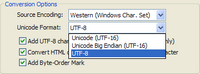
Unicode Format
There are 3 options in the Unicode Format listbox.
Unicode (UTF-16)
This is the native format of Unicode Text File on Windows. Select this option if you are converting plain-text files
Unicode Big-Endian (UTF-16)
This is the native format of MacOS and other Big-Endian System.
UTF-8
This format is mainly for HTML files. Select this option if you are converting HTML-based files.
This option is valid for converting to UTF-8 encoding only. When this option is enabled, Unifier will analyze the content of HTML files and update the char-set meta tag. By default, only HTML files with the following file extensions are updated.
.htm
.php
.html
.php3
.shtml
.phtml
.asp
Note: You may override which file extensions are treated as HTML by Unifier from File | Preferences command. Please read Preferences section for details.
This option specifies if Byte-Order Mark (BOM) is added in the beginning of converted file. In most case, BOM should be present to identify that the file is encoded in Unicode and its Transformation Format (UTF). If you are not sure the usage of BOM, just keep this option checked.
Tips:
You may override which file extensions are treated as HTML by Unifier from File | Preferences command. Please read Preferences section for details.